
Appearance
Architecture, Runtime, and Deployment
This section provides a technical overview of Turbo Launcher’s architecture, Secure Sandbox runtime, and deployment model.
What You'll Learn
- How Launcher, discovery, policy, and Secure Sandbox runtime interact
- How launches flow through Turbo Client and optional remote placement
- Where policy and configuration files live on the endpoint
1. Architecture and Core Concepts
1.1 High-level architecture
Turbo Launcher sits on the client and coordinates several subsystems:
- Application Discovery – Provider-based enumeration of installed and catalog applications.
- Policy System – JSON-based allowlist model for applications, files, mounts, runtime, and identity.
- Secure Sandbox Runtime – On-device sandbox that enforces isolation, DLP, and device constraints.
- Optional Remote Placement – Policy-controlled execution outside the endpoint with sovereignty guarantees.
- Turbo Client Integration – Launches apps via
turbo runwith the resolved executable and arguments.
The following diagram shows the relationship between these components on the endpoint:

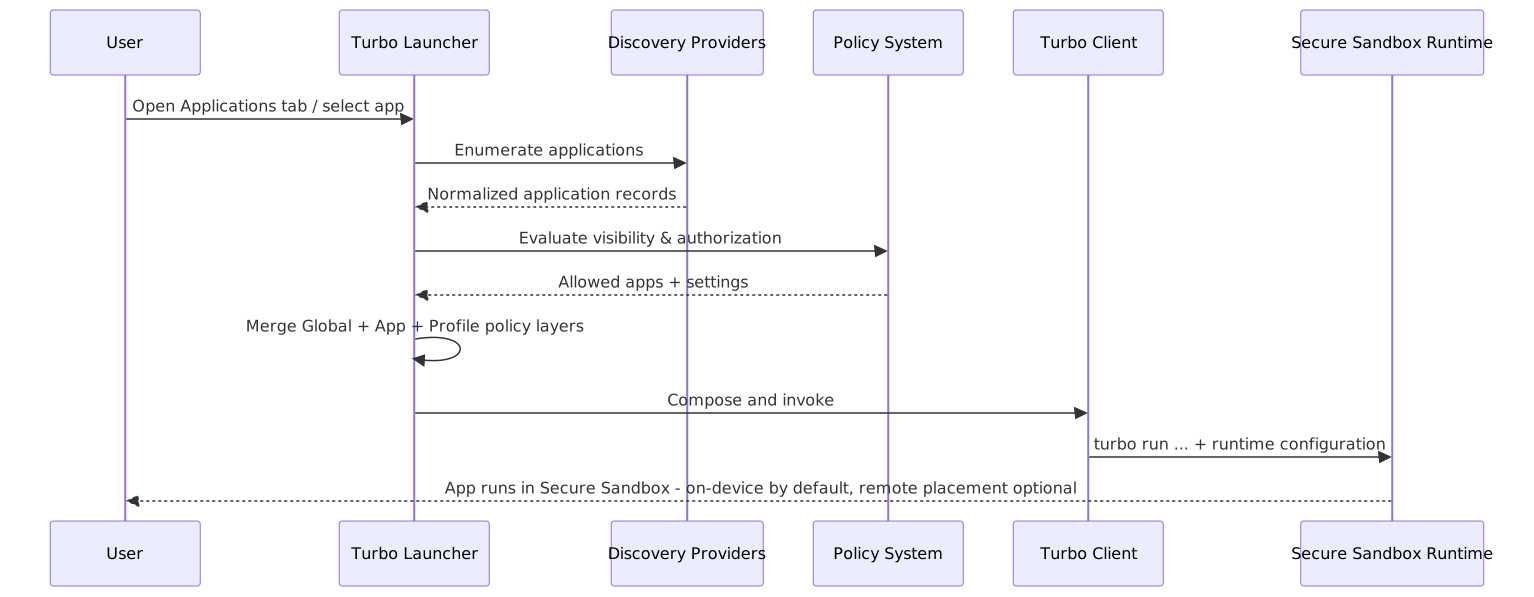
Typical launch flow:
- Discovery providers emit a normalized application record.
- Policy filters determine visibility and launch authorization.
- Launcher merges global, app, and launch profile policy layers.
- Launcher composes the Turbo command:text
turbo run base {turbo-flags} --name={instance-name} --startup-file="{executable}" -- {arguments} - Runtime settings (devices, dataMotion, files, incidentResponse, audit) are applied.
The following sequence diagram visualizes the same launch flow end-to-end:
For a broad overview, see:
1.2 Application Discovery model
Discovery is a provider-based pipeline:
- Providers enumerate candidate apps from OS sources or catalogs.
- Each candidate is mapped to a normalized application record.
- Policy filters determine visibility and authorization.
- The UI displays permitted apps grouped by provider and source.
- Changes are monitored in real time plus periodic reconciliation.
All providers emit the same normalized application record shape. For the full JSON schema, field definitions, and provider catalog, see the canonical reference:
At a high level, the normalized record contains:
- id, name, description – Identity and display metadata.
- iconRef – How to resolve icons (file, bundle, AppX, web manifest, etc.).
- source – Which provider emitted the record and its native identifiers.
- activation – How to launch the app (file path, AUMID, bundleId, desktopExec, URL, or PWA id).
- categories, tags – Classification and annotations used for grouping and policy.
- capabilities – File handlers, protocols, and tasks that can inform policy and associations.
Deduplication: When multiple providers produce the same logical app (e.g., MSIX + Start Menu shortcut + PWA), the Launcher uses provider priority and heuristics (name, icon, target/URL/scope) to keep a canonical record.
For provider configuration examples and a complete providers catalog, see:
1.3 Runtime configuration concepts
The runtime object controls Secure Sandbox behavior and is layered at:
- Global:
configuration.launch.runtime - Per-app:
apps[].modifications.runtime - Per-launch profile:
apps[].profiles[].runtime
Major sub-objects:
runtime.isolation– Placement & sovereignty.runtime.devices– Printers, removable media, bluetooth, NFC.runtime.dataMotion– Clipboard, drag-and-drop, screen capture/sharing.runtime.files– Files tab Storage Contexts.runtime.incidentResponse– EDR/XDR integration and forensic capture.runtime.audit– Integrity, fail-closed behavior, SIEM forwarding.
Example (global runtime with sovereign remote placement and audit):
json
{
  "configuration": {
    "launch": {
      "runtime": {
        "isolation": {
          "remoteSandbox": true,
          "remoteSandboxConfig": {
            "enforceSovereignty": true,
            "allowedRegions": ["aws-us-gov-west-1", "azure-us-gov-virginia"],
            "onPlacementFailure": "denyLaunch"
          }
        },
        "audit": {
          "settings": {
            "integrity": {
              "hashChain": true,
              "timestamping": {
                "mode": "rfc3161",
                "tsaUrl": "http://timestamp.provider.com"
              }
            },
            "failurePolicy": {
              "onFailure": "block",
              "requireHealthyFor": ["all"]
            }
          }
        }
      }
    }
  }
}2. Deployment and Setup
2.1 Installation
- Turbo Launcher is installed as part of the Turbo Client.
- A desktop shortcut named Turbo.net Desktop Launcher is created.
- Windows shell integration can be enabled to allow Run in Turbo for
.exefiles:bashturbo config --enable=RunInContextMenu
2.2 Policy file locations and loading
The Launcher Policy System uses a JSON-based policy file that may include:
json
{
  "policySignature": "...",
  "signatureCertificateThumbprints": ["..."],
  "configuration": { /* global settings */ },
  "configurationTemplates": [ /* templates */ ],
  "apps": [ /* app policies */ ],
  "fileTypes": [ /* file type definitions */ ],
  "fileAssociations": [ /* routing rules */ ],
  "files": [ /* file operation policies */ ]
}
Key points:
- Allowlist model: only explicitly allowed apps and operations are permitted.
- Policy may be signed; the client enforces signature and thumbprint checks where configured.
- If no valid policy is found, the Launcher shows "Policy file is not configured" and both Applications and Files tabs present a Retry option.
For deployment strategies (GPO, SCCM, Intune, scripted distribution) and policy paths, see:
2.3 Policy evaluation flow (high level)
- Discovery enumerates apps (shortcuts, bundles,
.desktop, catalogs, web/SaaS, CLI, portable, workspaces). apps[]policies are evaluated with matchAll / matchAny rules (targetPath, publisherCertificate, fileHash, etc.).- Authorization & Visibility rules determine whether an app is shown and can launch.
- Matching policies are merged with global and launch profile settings using precedence rules.
- File types and associations are resolved for Open/Preview/Edit/Print verbs.